Surface Treatment Routing
Surface Treatment is a secondary process group – its processes are applied in conjunction with, or subsequent to, the primary manufacturing processes that are used to manufacture a part. As such, they are not available for selection when indicating the primary process group (for example, in the Production Info window or in the Select Primary Process Group window). Instead, you can edit the process routing to include one or more Surface Treatment processes. All Surface Treatment processes are optional and by default they are not assigned automatically by aPriori, so you must explicitly include the processes of interest.
Follow these steps to include a Surface Treatment process in a routing:
-
In the Manufacturing Process pane, click the Edit menu and choose Routing Selection…
-
The Routing Selection window will appear. The last node of each routing is a Surface Treatment node. For the routing level of interest, click the + symbol to expand the Surface Treatment node into four intermediate nodes representing different types of Surface Treatment (Shot Blast, Painting Processes, Electroplating, and Labelling).
-
Click the + symbol on each intermediate node to expand it into distinct surface treatment processes. For example, the Painting Processes node expands into three distinct painting processes: a Wet Coat Line, a Powder Coat cart-based process, and a generalized Painting process that can be used to represent any painting process based on cost per surface area.
-
To include a specific surface treatment process in a routing, right-click on the process node and select Include from the popup menu. You can include multiple surface treatment processes as appropriate (for example, you may wish to select both Painting and Screen Printing for a given part).
Important: You must include the lowest-level process node or component-level operation node. If you include only an intermediate node (such as Painting Processes), aPriori does not automatically include the processes under it.
-
To remove a surface treatment process from a routing, right-click on the process node and select Exclude or Let aPriori Decide from the popup menu.
Surface Treatment Processes and Routing
Surface treatment processes include the following:
-
Anodize process (see Anodize Process Overview and Routing)
-
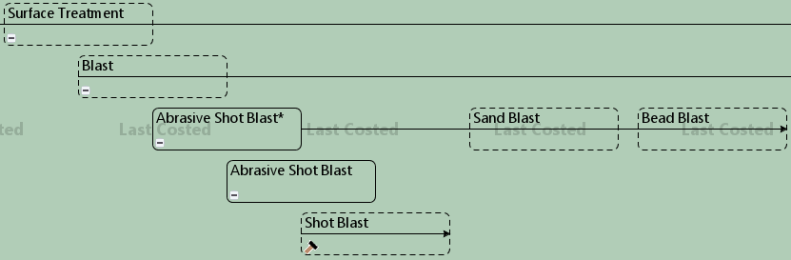
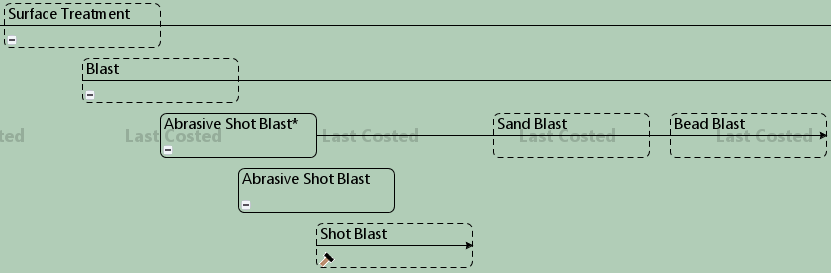
Blast processes (see Abrasive Shot Blast Routing):
-
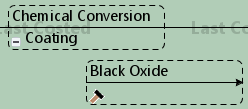
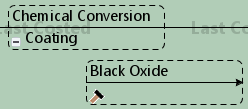
Black Oxide process: this is a chemical conversion coating for ferrous metal parts (metals whose main constituent is iron). In the five-stage process, parts are cleaned and rinsed before being soaked in a bath containing a Black Oxide solution. The chemical reaction that occurs forms a durable Black Oxide coating on the parts. The parts are then rinsed again prior to receiving a supplementary finish to protect the coating.
-
Conveyor Abrasive Finishing process: uses a conveyor belt to pass parts through a series of abrasive belts and/or brushes to achieve a desired surface finish or to perform functions such as deburring or rounding of sharp edges, slag removal, and oxide skin removal.
-
Degrease process
-
Electroplate processes:

-
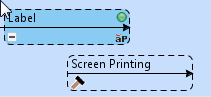
Label process:
-
Manual Paint: models the application of a specified number of coats of primer and a specified number of finish coats. Each primer or finish coat is preceded by hand sanding and hand cleaning, and is followed by curing. Any holes are masked by the Mask-Bench process. See also Manual Paint Inputs
-
Mask-Bench process (see Mask-Bench Routing):

-
Oven Cure process (see Oven Cure Routing):

-
Paint processes (for Conveyor Processes, see Conveyor Processes, for Powder Coat Cart, see Powder Coat Cart Routing):

-
Passivation process
-
Shot Peen process
-
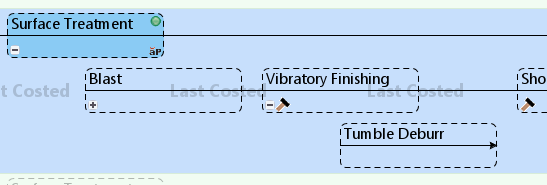
Vibratory Finishing process (models tumble deburr; surface finishing to be added in a future release):






Abrasive Shot Blast Routing
Shot Blasting is a method of cleaning metal parts. Typically, single large parts or batches of smaller parts are manually loaded onto a hanger-style machine. The hanger is then moved into a Shot Blast chamber and the parts are blasted with spherical shot media. There may be more than one instance of shot blasting, for example to produce a contiguous sequence of rough, medium, and fine finishes on the same part(s).
-
Select Routing Selection in the Manufacturing Process pane.
-
Expand the Surface Treatment and Blast nodes.
-
Right-click the top-level Abrasive Shot Blast node.
-
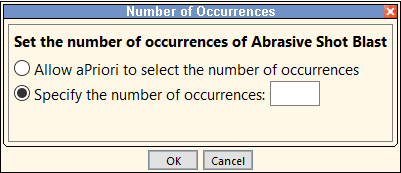
Select Number of Occurrences.
-
Enter a value in the Specify the number of occurrences box:
-
Click OK.
For example, if you enter a value of 3, you will see Shot Blast, Shot Blast:2, and Shot Blast:3 displayed under the Surface Treatment process step in the Manufacturing Process pane. Each of these instances will use the default value for their Shot Blast Media setup option.
In addition, you can use either the Cost Model Workbench or the Digital Factory Manager to populate the shotBlastInstances lookup table with multiple Shot Blast instances with distinct shot media types for each. This will automatically add the defined number of Shot Blast instances as a Surface Treatment process to every feasible routing (note this will apply also to the Investment Casting process – see Processes). To do this:
-
Navigate to the shotBlastInstances lookup table in either the Cost Model Workbench or the Digital Factory Manager:
-
Cost Model Workbench: Open the shotBlastInstances table on the Lookup Tables tab under Globally Available CSL/Lookup Tables (using the Surface Treatment Cost Model for the Digital Factory), and, if necessary, click the Override button.
-
Digital Factory Manager: Double-click shotBlastInstances (Component) under Surface Treatment > Lookup Tables, and, if necessary, click the Override button.
-
-
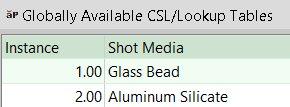
Number each instance in ascending order and, if you want to use a different shot media for any of the instances, enter the correct name of the media (as defined in the Shot Blast tool materials table):
-
Save the data.
For example, if you create 2 instances, you will see Shot Blast and Shot Blast:2 displayed under the Surface Treatment process step in the Manufacturing Process pane. Each of these instances will use the shot media specified in the shotBlastInstances table for their Shot Blast Media setup option; if any cells were left blank, the default shot media will be used for those instances.
Anodize Process Overview and Routing
Anodizing is an electrochemical process that converts the metal surface of a part into a decorative, durable, corrosion-resistant, anodic oxide finish. aPriori’s anodizing cost model supports aluminum parts, and uses one process, Anodize, which has several component-level child operations. The child operations are divided into three groups: Pre-treatment operations, Anodizing operations, and Post-treatment operations:

The pre-treatment operations include the following:
-
Clean: removes any grease or dirt from the surface.
-
Etch: removes some of the aluminum material from the top surface.
-
Deoxidize: removes surface oxides.
-
Rinse: the part is rinsed multiple times during pre-treatment.
The Anodizing operations include the following:
-
One of the following:
-
Anodize Type I: chromic acid anodizing
-
Anodize Type IB: low voltage, chromic acid anodizing
-
Anodize Type IC: non-chromic anodizing
-
Anodize Type II: sulfuric acid anodizing
-
Anodize Type III: hard anodic coatings (possibly sulfuric acid)
This is the main stage of the process, during which the part is dipped in the acid bath to form the oxide film.
-
Note that type IIB anodizing is also supported; see below.
-
Rinse
-
Spray Rinse
The post-treatment operations include the following:
-
Seal (optional): closes the pores on the part. This is included by default, but users can override the default on a part-by-part basis with the setup option Enable Sealing Operation.Typically, if parts are painted, they are not sealed.
-
Dry
When you add Anodizing to your routing, be sure to specify which Anodizing operation you want to include:

To estimate the cost of type IIB anodizing, select Anodize Type II, and use the setup option Specify Anodize Coating Thickness to set the layer thickness to the desired value, which typically is between 0.00635mm and 0.01016mm (0.0004 inch and 0.00025 inch).
Anodizing is optionally preceded by the Mask-Bench process, to model the process of masking portions of the part that should not be anodized. If you want to model any masking, manually include the Mask-Bench process in your routing. Once the process is included, you can manually assign individual features to the Masking operation:

In addition, threaded holes and threaded curved walls are automatically assigned feature masking.
Conveyor Processes
Conveyor Processes is a branch node (under the Paint node) that incorporates several surface treatment processes that are connected by a conveyor system.

The processes are:
-
Conveyor Part Loading: The Conveyor Part Loading process is the first process under the Conveyor Processes branch node. In this process, parts are loaded (manually or mechanically) onto the load bars that hold the parts as they move through the conveyor system.
-
Conveyor Shot Blast (optional): Conveyor Shot Blasting is a method of cleaning metal parts. Parts are transported on the conveyor system via load bars that are arranged into nesting groups to support the weight and size of the parts as they are blasted with spherical shot media. Conveyor Shot Blast provides the setup options described in Conveyor Shot Blast Inputs.
-
Conveyor Conversion Coating (optional): In this process, parts are sprayed with a protective chemical coating to prepare them for subsequent powder coating. Parts are suspended from the moving conveyor system as they are sprayed by either a chromate or phosphate solutions. Conveyor Conversion Coating also provides multiple setup options (see Conveyor Conversion Coating Inputs).
-
Conveyor Dry (optional): In the Conveyor Dry part of the Powder Coat Conveyor process, parts are air-dried or oven-dried in preparation for the Conveyor Powder Coating process.
-
Powder Coat Conveyor (optional): This consists of the two processes described below and also provides multiple setup options (see Powder Coat Conveyor Inputs):
-
Conveyor Powder Coating: In this part of the Powder Coat Conveyor process, parts are sprayed with a top coat and, optionally, a clear protective coat.
-
Conveyor Oven Cure: In the Oven Cure stage of the Powder Coat Conveyor process, the powder coating(s) that have been applied to the parts are cured as they pass through an oven. The line speed of the process varies according to the length of time required for the coatings to cure.
-
-
Conveyor Part Unloading: The Conveyor Part Unloading process is the last process under the Conveyor Processes branch node. In this process, parts are lifted (manually or mechanically) off the load bars for inspection.
Parts are carried on equally-spaced load bars (arranged in nesting groups) and transported through the selected individual processes in a continuous overhanging conveyor system.
The nesting space available for parts depends on the following machine properties:
-
Max Nesting Height: The maximum height available for nesting parts (mm). This is also displayed as an information-only setup option (see Nesting Height Constraint).
-
Opening Width: The maximum width of the machine's opening (mm). This is also displayed as an information-only setup option (see Opening Width Constraint).
-
Loading Area Width: The width of the machine loading area (mm). This is also displayed as an information-only setup option (see Part Handling Area Length Constraint).
-
Unloading Area Width: The width of the machine unloading area (mm). This is also displayed as an information-only setup option (see Part Handling Area Length Constraint).
-
Loading Area Length: The length of the machine loading area (mm). This is also displayed as an information-only setup option (see Part Handling Area Length Constraint).
-
Unloading Area Length: The length of the machine unloading area (mm). This is also displayed as an information-only setup option (see Part Handling Area Length Constraint).
Mask-Bench Routing
The Mask-Bench process masks holes and surfaces using a combination of adhesive tape and silicone plugs. aPriori automatically includes the Mask-Bench process in the Manual Paint process. In addition, some processes require threaded holes to be masked if they are included. These processes are specified in the automaticMaskingProcessList lookup table, which includes Anodize, Powder Coat Cart, and Powder Coat Conveyor processes in starting point Digital Factories.
By default, aPriori masks smaller holes with plugs using the Plugging operation and larger holes with tape using the Masking-Bench operation. Users can configure the maximum hole size to be plugged using the maskBenchMaxPlugSize (for width) and maskBenchMaxPlugLength (for length) cost model variables (respectively 65 mm and 35 mm by default in starting point Digital Factories). Users can also manually override the operation assignment:
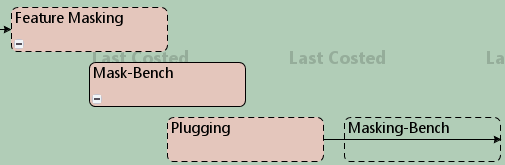
Note: If you exclude Plugging for a particular operation, for example on a simple hole, aPriori automatically assigns the Masking-Bench operation to the hole instead. However, the reverse is not true: if you include the Masking-Bench operation after a Plugging operation, aPriori does not automatically exclude the Plugging operation; the cost model will still include the Plugging operation before the Masking-Bench operation and the same hole will have both the Plugging operation and the Masking-Bench operation assigned to it. Therefore, in this scenario, you must exclude the Plugging operation in addition to including the Masking-Bench operation.
Powder Coat Cart Routing
Powder Coat Cart is a dry finishing process in which powder is applied to the surface of a part or parts via electrostatic spray guns before the powder is melted and cured to provide a uniform surface finish. Parts are loaded in batches onto a rolling cart and the cart is moved between the various workstations. Parts stay on the cart throughout the duration of the process until they are unloaded.
If the part contains at least one threaded hole, aPriori automatically includes the Mask-Bench process before the Powder Coat Cart process. aPriori also automatically includes the Oven Cure process after the Powder Coat Cart process when a routing includes Powder Coat Cart. At a high level, the process is as follows:
-
Optionally, surfaces and holes are masked or plugged using the Mask-Bench process.
-
Parts are manually loaded onto the powder coat cart.
-
The cart is moved into the powder coat machine booth.
-
A top coat layer of powder is applied.
-
Parts are moved into a conventional convection oven.
-
The powder is cured in the oven.
-
Optionally, an additional clear coat (matt or gloss) is applied to the parts; this entails moving the parts back into the powder coat booth followed by another curing operation in the oven.
-
The parts are unloaded from the cart.
Oven Cure Routing
Parts that have completed a painting or coating process are placed into an oven to cure the coating for a specific period of time. The Oven Cure process is included automatically if Powder Coat Cart is in the routing.
The Oven Cure process uses information provided by nodes that auto-include it in the routing, that is, if they have the node attribute requireOvenCure, as is the case for Powder Coat Cart. As a result, the Oven Cure process cannot be included in the routing if there are no processes with the node attribute requireOvenCure in the routing. In all cases where Oven Cure is automatically included, users may choose to exclude the process using the Routing Selection window.